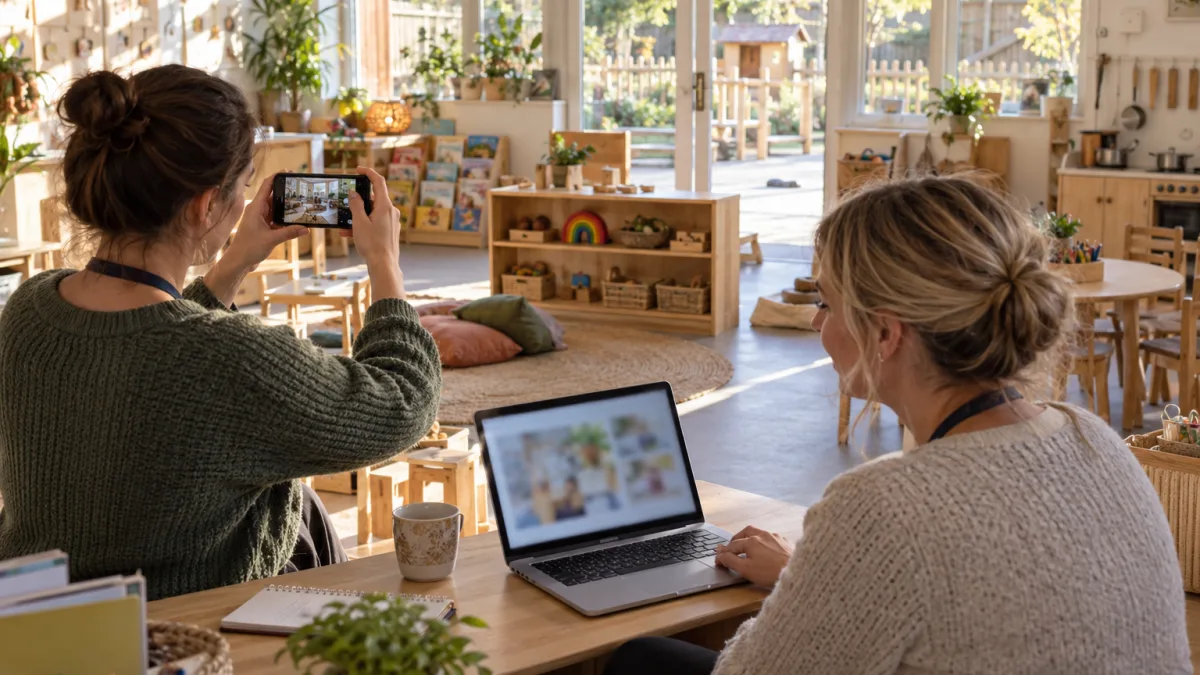
Parents often form their first impression of a nursery before speaking to a member of staff or walking through the door. They may discover the setting through a search result, directory profile, social media page or recommendation shared in a local parent group.
Within a few minutes, they are likely to decide whether the nursery appears relevant, trustworthy and worth contacting. This decision is rarely based on an elaborate website or professional video. It is usually shaped by much simpler details: accurate opening hours, clear photographs, visible fees, a working enquiry form and a sense that real people are caring for the information.
A weak online presence does not necessarily mean that a nursery provides poor care. However, parents cannot see the quality hidden inside the building. If the website looks neglected, information conflicts across different platforms or nobody replies to an enquiry, families may reasonably wonder whether communication after enrolment would feel the same.
Improving a nursery’s first impression online does not require constant posting or an expensive redesign. It requires a small number of useful pages, honest information and a reliable route from initial search to visit.
Begin with the questions parents need answered
A nursery website should be organised around the parent’s decision rather than the provider’s internal structure.
Parents arriving for the first time commonly want to know:
- Where is the nursery?
- Which ages does it accept?
- What time does it open and close?
- Does it operate throughout the year or during term time?
- Are places likely to be available?
- How much does it cost?
- Does it offer funded childcare?
- What is daily life like?
- Who will care for my child?
- How do I arrange a visit or check availability?
These details should be visible on the homepage or reachable through an obvious menu. A parent should not have to download a prospectus simply to learn that the nursery closes before they finish work.
Try opening the website as though you know nothing about the setting. Can you identify its location, age range and opening hours within 30 seconds? If not, those details are probably too difficult to find.
Our guide to what parents look for first on a nursery website explores these priorities in more detail.
Make the homepage clear before making it clever
The homepage does not need to tell the nursery’s complete story. Its main job is to confirm that the visitor has found a potentially suitable provider and help them take the next step.
A useful opening section might include:
- The nursery’s name
- Its town, neighbourhood or full location
- The ages accepted
- A short and specific description of the setting
- A clear button to check availability or arrange a visit
For example:
“A small, independent day nursery in Northfield caring for children from six months to five years. Open Monday to Friday, 7.30am to 6pm, for 51 weeks of the year.”
This is more useful than a headline such as “Where little dreams grow” because it immediately tells the parent what the nursery is and whether it could fit their family.
A warm message can still appear, but it should not replace practical information. Families appreciate personality after they have established that the setting accepts their child’s age and covers the hours they need.
Avoid filling the first screen with a large image, animation or promotional slogan while hiding the location and enquiry button below it. The website may look attractive but still make the parent work unnecessarily hard.
Use current photographs of the real setting
Photographs strongly influence a parent’s first impression because they provide the earliest glimpse of the environment their child may enter.
Use recent images of the actual nursery wherever possible. Parents commonly want to see:
- The entrance used by families
- Rooms for different age groups
- The outdoor space
- Meal and creative areas
- Quiet or sleep spaces
- Resources available during ordinary play
The rooms should look clean and cared for, but they do not need to appear untouched. Evidence of real play can make the setting feel more believable. A partly built block tower, accessible books or children’s artwork can communicate more than a perfectly empty room photographed after closing time.
Avoid relying heavily on generic stock images. A beautiful photograph of children in an unrelated nursery may create the wrong expectation, particularly if the architecture, garden or resources do not resemble the real setting.
If an image is illustrative rather than showing the nursery itself, make that clear. Parents should never arrive for a visit and discover that the environment they admired online belongs to another provider.
Protect children’s privacy carefully. Use photographs only with appropriate permission and check backgrounds for names, learning records, medical details or other personal information. Consent for an internal observation system does not necessarily cover publication on a public website or social media page.
Compress images so that they load quickly, especially on mobile connections. A large gallery is not helpful if the page remains blank while a parent waits.
Show the people behind the nursery
Parents are choosing the adults who will feed, comfort, encourage and protect their child—not only a building and a collection of resources.
A simple staff page can make the nursery feel much more approachable. Introduce the manager, room leaders, special educational needs coordinator and other practitioners families are likely to meet.
Short, relevant descriptions are usually more effective than formal biographies. Explain:
- The person’s role
- Which age group they work with
- Their relevant experience or qualifications
- A genuine professional interest
For example:
“Amira leads our toddler room and has worked in early years for eight years. She has a particular interest in early communication and helps new children build confidence during settling sessions.”
Keep photographs and roles current. A page containing staff who left two years ago can undermine trust immediately. It may also create an uncomfortable visit when parents ask to meet someone who no longer works there.
Avoid making the team appear larger or more qualified than it is. Accurate, modest information creates a stronger impression than exaggerated claims that are difficult to support.
Be open about fees and funded childcare
Cost is central to almost every childcare decision, yet it is frequently absent from nursery websites.
Providers may hesitate to publish fees because arrangements vary by age, session, funding and attendance pattern. Others worry that a visible price will discourage parents before they understand what is included.
However, refusing to mention cost does not remove it from the parent’s decision. It simply requires them to submit an enquiry before learning whether the nursery is affordable.
If possible, publish current daily or session rates and state what they include. If the fee structure is too variable for a simple list, explain how charges are calculated and offer an individual illustration.
Parents may need to understand:
- Whether meals and snacks are included
- Whether nappies and consumables are provided
- Whether there is a registration fee or deposit
- The minimum number of sessions that can be booked
- How holidays, absences and bank holidays are charged
- When fees were last reviewed
Funded childcare deserves a specific explanation. Do not stop at “15 and 30 hours accepted”. State which entitlements the nursery offers, whether funded places are limited and how the hours are normally scheduled.
If funding is stretched across the year, explain that the same annual entitlement is divided across more weeks. If meals or additional attendance remain chargeable, make this clear before registration.
Parents can be directed to our guides on funded childcare eligibility and how the 30 hours funded childcare scheme works. The nursery’s own website should then explain how the funding is delivered at that particular setting.
Explain what an ordinary day feels like
Nursery websites often contain positive phrases that could apply to almost any provider: caring staff, stimulating activities, a nurturing environment and learning through play.
These ideas matter, but parents gain a stronger impression from specific examples.
Describe what happens when children arrive. Explain whether babies follow individual sleep and feeding routines, when children use the garden and how practitioners balance child-led play with small-group experiences.
A short description might say:
“Children begin the morning with unhurried play while practitioners welcome each family. Babies follow their individual feeding and sleep routines. Toddlers and preschool children can move between indoor activities and the enclosed garden for much of the day, with stories, songs and small-group experiences woven into their play.”
This gives parents a much clearer picture than a list of activity names.
Use real examples to support your claims. If outdoor learning is an important part of the nursery, explain what children recently explored outside. If practitioners follow children’s interests, describe how one interest developed over several days.
Avoid presenting every day as an endless programme of special events. Families also want to know how staff manage meals, rest, difficult emotions, disagreements and quiet moments.
Make settling and communication visible
Many parents begin a nursery search with an emotional concern beneath the practical questions: how will my child cope without me?
A clear settling-in page can create reassurance before the first conversation. Explain how introductory visits work, who will become the child’s key person and how the process can be adjusted for individual needs.
Do not promise that every child settles quickly or stops crying as soon as their parent leaves. Separation can be difficult, and unrealistic assurances may make parents feel worse when their child responds normally.
Instead, describe what practitioners do:
- Gather information about the child’s routines and preferences
- Welcome familiar comfort items
- Build a relationship during settling visits
- Comfort the child calmly after separation
- Contact the family when additional reassurance or collection is needed
- Review the settling plan when progress is difficult
Explain how communication continues after the child starts. Parents may want to know whether they receive conversations at collection, app updates, daily diaries or regular key-person summaries.
Be realistic about the amount of documentation. Frequent photographs can be welcome, but parents also value knowing that practitioners spend most of their time interacting with children rather than recording every activity.
You can offer parents additional support through our first-month nursery guide and advice on handling difficult nursery drop-offs.
Make contact and enquiries easy
Once a parent is interested, the next action should be obvious. They should not have to search the footer for a tiny email address or create an account before asking a simple question.
Provide at least one clear route to:
- Check availability
- Arrange a visit
- Ask about fees or funded places
- Discuss a child’s individual needs
A short enquiry form can ask for the parent’s name, contact details, child’s date of birth, preferred start date, required days and approximate hours. That is usually enough for an initial availability check.
Avoid requesting detailed medical, financial or family information before it is necessary. Sensitive discussions can take place through an appropriate and secure process after the initial contact.
Tell parents what happens after they submit the form. A useful confirmation might explain that the nursery will respond by email or telephone within two working days.
Test the form regularly from both a phone and computer. Check that:
- The message reaches the correct inbox
- The parent receives a clear confirmation
- Required fields are easy to understand
- An error does not erase the whole form
- Somebody is responsible for replying
A nursery can lose strong enquiries simply because messages are sent to an old address or remain unnoticed during staff absence.
If there is no availability, reply clearly. Explain whether a waiting list exists, when places may next be reviewed and whether the parent needs to contact the nursery again.
Keep information consistent wherever parents find you
The website is only one part of the nursery’s online presence. Parents may first encounter the setting through a childcare directory, local authority listing, map result or social media profile.
Basic information should agree across all of them. Check:
- The nursery name
- Address and map location
- Telephone number and email address
- Opening hours
- Website address
- Age range
- Photographs
- Availability statements
Conflicting details create unnecessary doubt. If the website says the nursery opens at 7.30am but a directory says 8am, a parent may not know which information to trust.
Claim and maintain the nursery’s Google Business Profile where appropriate. Add the correct category, telephone number, website and opening hours. Update special hours for holidays and closures rather than leaving parents to guess.
Check the map marker as well. A pin at the wrong entrance or on the opposite side of a large building can create a poor first experience when a family arrives for a visit.
Our guide to keeping a nursery profile accurate and useful explains how to manage these details without creating an excessive administrative burden.
Use social media to support trust, not replace information
Social media can show the personality of a nursery, but it should not become the only place where important information is published.
A parent should not need to scroll through months of posts to find opening hours, fees or instructions for arranging a visit. Keep core information on the website and use social channels to show current, appropriate glimpses of nursery life.
Useful posts may include:
- A recent activity and what children explored through it
- A change to opening or enquiry arrangements
- An introduction to a new staff member
- A reminder about an open day
- A look at a newly developed play area
- General support for parents starting nursery
Quality is more important than frequency. One thoughtful post every week or two can create a better impression than several rushed posts containing repetitive captions.
Follow the same privacy and consent standards used on the website. Consider whether images reveal names, location patterns or other personal information. Avoid publishing content simply because it may perform well if it does not respect the child.
Do not allow an abandoned social media account to confuse families. If a platform is no longer monitored, remove it from the website or add a clear message directing parents to the correct contact route.
Make the experience work properly on a phone
Many parents search for childcare on a phone, sometimes while commuting, feeding a baby or fitting research into a short break.
A mobile-friendly nursery website should allow them to:
- Read the main information without zooming
- Use the menu easily
- Tap the telephone number
- Open directions
- View photographs without a slow download
- Complete an enquiry form comfortably
Check the site on a genuinely small screen rather than only reducing the width of a desktop browser. Look for long email addresses, wide tables and large images that force the page to scroll sideways.
Downloadable PDFs often create problems on phones. A fee sheet designed for A4 printing may require repeated zooming and sideways movement. Where possible, put frequently used information directly on a responsive webpage.
Pop-ups should not cover the whole screen or make the close button difficult to reach. Cookie controls, chat boxes and promotional messages can quickly leave very little space for the actual content.
Speed matters too. Parents may leave if the homepage loads slowly because of an automatic video, oversized gallery or unnecessary animation.
Build trust with specific and honest language
Parents expect a nursery to speak positively about its work. They do not expect every setting to claim that it is exceptional in every possible way.
Phrases such as “the best nursery in the area”, “unrivalled facilities” and “every child reaches their full potential” are broad and difficult to prove. Specific information feels more credible.
Instead of saying:
“We provide outstanding communication with parents.”
Explain:
“A practitioner speaks to each family at collection, and key persons provide a more detailed update about interests and development every month.”
Instead of:
“We have amazing outdoor provision.”
Write:
“Children can use our enclosed garden throughout most of the day and take regular supervised walks to the nearby park.”
Testimonials can support trust when they are genuine, current and used with permission. A small number of detailed comments is usually more convincing than a long page of anonymous praise.
If displaying an inspection judgement, include the inspection date and link to the official report. Do not present an old judgement as though it describes a recent inspection.
A clear complaints process also supports trust. It does not suggest that the nursery expects problems. It shows that the provider accepts accountability and has a process for listening to concerns.
Create a simple review routine
An online presence deteriorates gradually. A staff member leaves, fees change, a room is reorganised and the person who receives website enquiries takes on another role. None of these changes appears serious alone, but together they can make the nursery look neglected.
Give one person responsibility for coordinating updates, while making clear that the wider team should report changes.
Review the main online information at least once each term and immediately after a significant change. The review should cover:
- Opening hours and closure dates
- Fees and funding arrangements
- Age groups and room information
- Staff names, photographs and roles
- Availability messages
- Menus and policies
- Inspection details
- Website forms and email addresses
- Directory and map listings
- Social media links
Ask somebody unfamiliar with the website to test it occasionally. Nursery staff already know where information is located and may unconsciously fill in details that are not actually present.
A useful test is to imagine three different visitors:
- A parent seeking care for a ten-month-old from 8am to 5.30pm
- A family needing a funded place for a three-year-old
- A parent whose child has a serious allergy or additional need
Can each person quickly discover whether the nursery may be suitable and identify whom to contact next?
Frequently asked questions
Does a nursery need an expensive website?
No. A simple, fast and accurate website can create a stronger impression than an elaborate site containing outdated information. Prioritise practical details, genuine photographs, readable pages and a reliable enquiry process.
What should appear at the top of the homepage?
Show the nursery’s name, location, age range, a clear description and an obvious enquiry or visit button. Opening hours should also be visible immediately or within one easy click.
Should nurseries publish their fees online?
Publishing fees helps parents judge affordability and can reduce unsuitable enquiries. If charges depend on sessions, age and funding, explain the structure and offer a personalised written illustration.
Should a nursery display current availability?
A general availability update can be helpful if somebody maintains it. Make clear that any place must still be confirmed for the child’s age, required days and proposed start date.
Are stock photographs acceptable?
They can support general content, but they should not be presented as photographs of the nursery. Parents benefit most from recent images of the real entrance, rooms, garden and resources.
How often should nursery website information be reviewed?
Review core information at least once each term and update it promptly after changes to fees, staff, opening hours, funding, rooms or contact details.
Does a nursery need to post on social media every day?
No. Regular, thoughtful and appropriate posts are more useful than constant content created without a clear purpose. The website should remain the main source of essential information.
What should a nursery enquiry form ask?
For an initial enquiry, the parent’s name, contact details, child’s date of birth, required days, approximate hours and preferred start date are normally sufficient. Avoid collecting unnecessary sensitive information.
Should staff profiles include qualifications?
Relevant qualifications and experience can reassure families, but explain what each person actually does. Parents are interested in who will care for their child and how that person supports children.
How can a nursery make its website feel more personal?
Use photographs of the real setting, introduce the team and describe everyday routines in specific language. Genuine details create warmth more effectively than decorative slogans.
What is the biggest online mistake nurseries make?
Allowing essential information to become outdated is one of the most damaging mistakes. Incorrect hours, departed staff, broken enquiry forms and old availability messages can quickly weaken trust.
How can a nursery tell whether its online presence is working?
Ask new enquirers how they found the nursery and what encouraged them to make contact. Track whether enquiries contain the information needed to check availability and whether families arrive with accurate expectations about the setting.
A strong first impression online does not come from making a nursery appear perfect. It comes from helping parents understand what the setting genuinely offers.
Clear practical information shows respect for families’ time. Current photographs help them picture their child in the environment. Honest explanations of fees, funding, routines and settling begin building trust before the first visit.
When the website, profiles and enquiry process all feel accurate and cared for, the nursery’s online presence starts to reflect the thoughtful work already happening inside the setting.